
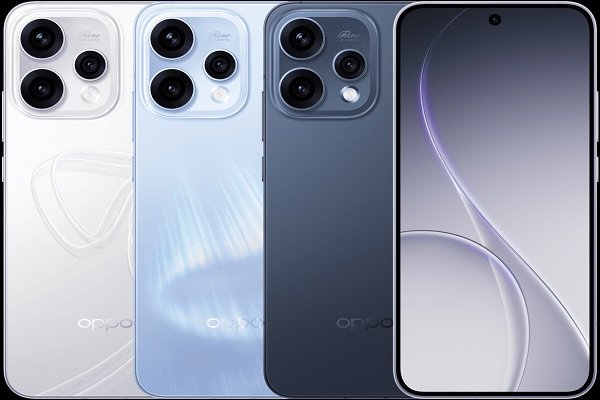
A portrait photo can be broken down into compositional elements such as contours, colors, lighting, and negative space. Most smartphones merely record light without fully restoring the photographer’s intent.
The optimization direction of the OPPO Reno15 5G is to bring the photography process closer to image composition. This article starts from four technical challenges related to image construction and explains how this phone achieves high-quality portrait output.
1. Outline — How to Draw Clear Lines?
The first stroke in painting a portrait is the outline. When a phone takes a portrait, the outline is the edge — the distinction between the face shape and collar, the boundary between jewelry and skin. If these areas are poorly handled, the entire photo looks “fake.”
The 50MP Telephoto Portrait Camera:
- The 3.5x optical zoom, Optical zoom does not sacrifice pixels; all 50MP of detail are preserved. The direction of hair strands, the curve of eyelashes, the texture of clothing — every stroke is clear.
- The 200MP Ultra-Clear Main Camera, when there is sufficient light, can draw the outline, leaving ample room for post-cropping. Not satisfied with the composition? Crop out half, and the outline remains clear.
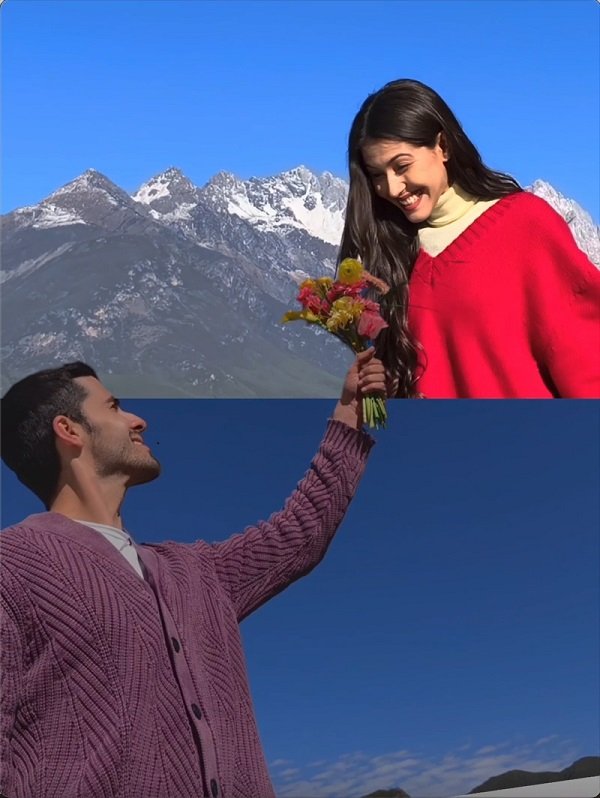
2. Color — How to Mix True Skin Tone?
The biggest fear when a phone takes portraits is “color shift.”
Natural Tone is the palette.
It doesn’t alter colors; it doesn’t oversaturate or brighten just to look “good.” The skin tone it mixes is the color of the light itself.
Skin Tone Improvement is the colorist.
Trained on vast skin tone data, it can accurately recognize skin tone performance under different lighting conditions. It understands that every skin tone has its own proper appearance.
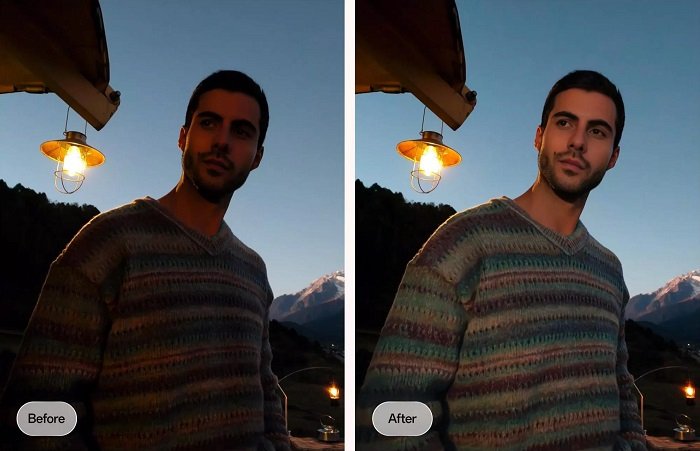
AI Portrait Glow is the lighting technician.
In backlit or low-light situations, it automatically adds soft fill light, ensuring skin tone remains visible under complex lighting. It doesn’t harshly illuminate, but gently adds a stroke, allowing the skin tone to come through.
3. Negative Space — How to Make the Background Quiet?
If the background is too full, the person loses their breathing room. When phones take portraits, the background is either too cluttered or too fake.
- The 3.5x Telephoto Vibe Portrait mode uses optical bokeh to let the background recede naturally. It’s not “smeared” out by an algorithm; it’s formed naturally as light passes through the lens.
- The beauty of optical bokeh lies in its “layering.” The background closer to the subject is slightly blurred, while the background further away is even more blurred. Point light sources transform into rounded bokeh circles, not harsh rings. The background is quiet, yet retains its atmosphere; the subject stands out, yet is not isolated.
- AI MotionPhoto Eraser is the eraser. Shooting on the street, and a passerby gets in the frame? Erase them with one stroke, and the background is automatically filled in. No need to wait for the crowd to disperse or to redraw the scene.
4. Light — How to Paint Light in Darkness?
The fourth stroke in painting a portrait is light. Without light, the painting cannot be seen. When phones take night portraits, the result is either too dark or too bright.
- The 200MP Ultra-Clear Main Camera is the first stroke in painting light in darkness. Light sensitivity is significantly enhanced, noise is suppressed, and shadow details are preserved.
- AI Flash Photography 2.0 is the highlighter for painting light. When flash is needed, it intelligently balances the subject and background.
- AI MotionPhoto Slow-Mo is the stroke for painting the trajectory of light. Fireworks bursting, petals falling — these lights flow in an instant. It helps you slow them down, painting the trajectory of light.
5. How Does Popout Facilitate Recreation?
Popout is a creative imaging feature built into the OPPO Reno15 5G. Its core concept is simple: it allows you to “pop” the subject from a photo or Live Photo out of the background with one tap, and then combine it with other photos to form a creative collage with a prominent subject and distinct layers.
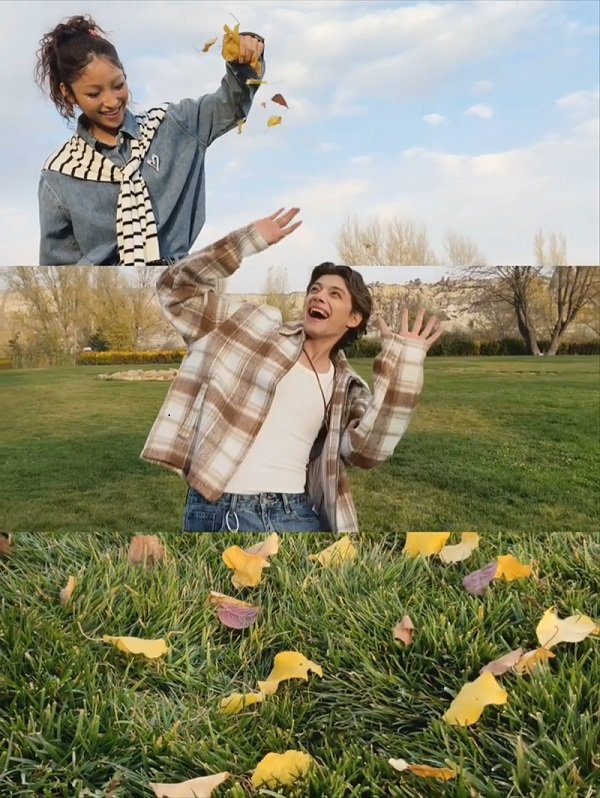
- Ease of Use: No third-party software required. Select a Live Photo in the gallery, tap Popout, and a creative template is generated within seconds without compromising original image quality.
- Functional Principle: Based on AI Motion Photo technology, after capturing a Live Photo, AI automatically identifies the subject and precisely separates the foreground from the background, generating a multi-layered collage effect with a sense of depth.
- Use Cases: Travel selfies, group photos at gatherings, everyday self-portraits… effortlessly generate creative photos.
FAQS
Q1: When taking backlit portraits, the face is too dark. What should I do?
A: AI Portrait Glow automatically adds soft fill light, acting like a gentle stroke from a lighting technician, brightening the face while preserving the glow of the background.
Q2: How can I remove a passerby who accidentally entered the frame?
A: AI MotionPhoto Eraser is the eraser. With one stroke, the passerby disappears, and the background is automatically filled in.
Q3: Is the image still clear after cropping a photo taken with the OPPO Reno15 5G?
A: Even after cropping out three-quarters, the remaining portion is still sufficient to create a high-definition main image.
Q4: When taking photos of someone wearing glasses, what about lens reflection?
A: AI edge optimization can identify the lens area and will not mistakenly blur the reflection as part of the background. The transition around the frame edges is natural.
Q5: Why do some phones produce portraits where the background bokeh looks like a sticker?
A: Because that is “smeared” out by an algorithm. The OPPO Reno15 5G uses optical bokeh, resulting in rounded, layered bokeh circles, not a harsh, uniform blur.
Q6: When shooting portraits on a cloudy day, the face looks grayish. What should I do?
A: Natural Tone restores the soft, cool tones of an overcast day without forcibly brightening them, making the skin tone look exactly as it should on a cloudy day.
Conclusion
The essence of portrait photography lies in the synergy between the photographer and the lighting environment. Shooting distance determines the rendering of the subject’s contours, lighting conditions affect color reproduction, shooting angle relates to image composition and negative space, and shutter operation is responsible for capturing instantaneous frames. The OPPO Reno15 5G provides a complete imaging solution from capture to creation, covering five technical dimensions, ensuring that both facial features and scene elements achieve high-quality image output.
